Manage Padel and Futsal Court Bookings on WhatsApp Without Clashes
How to manage padel and futsal court booking on WhatsApp: one schedule for every channel, clear deposit rules and per-court time slots, so bookings never clash.

cshub
23 Oct 2026 8 min read
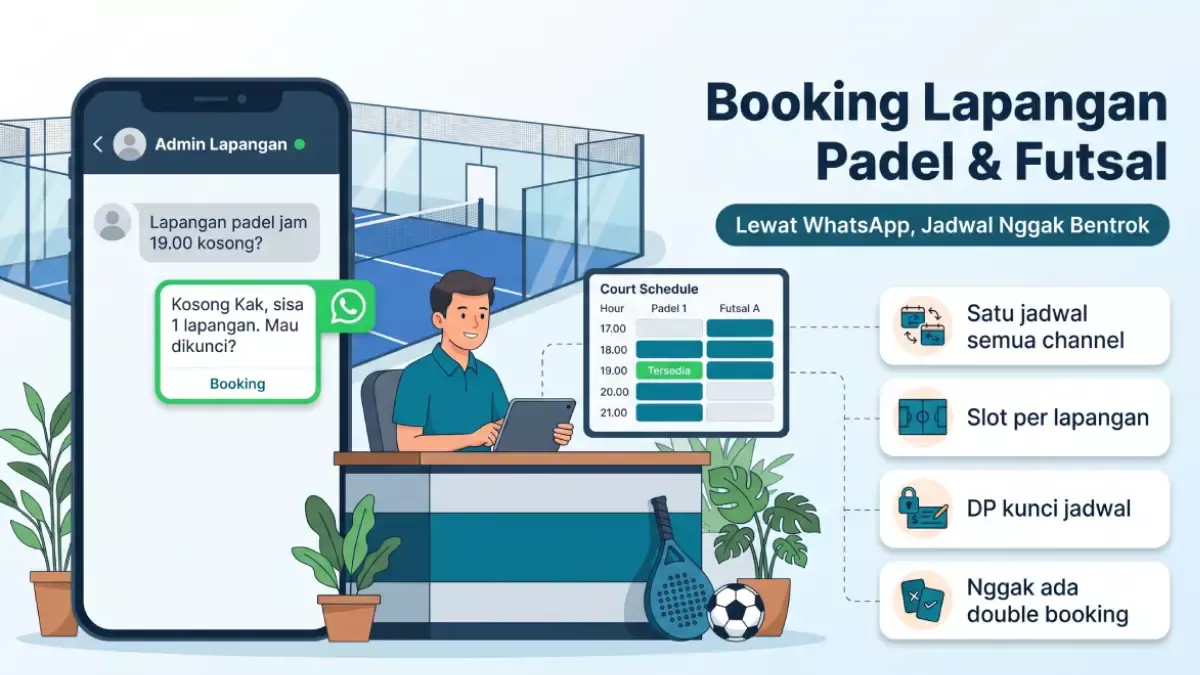
Padel and futsal court bookings on WhatsApp stay organized when every request goes into the same schedule, each court has its own hourly slots, and a slot only counts as locked once the deposit is paid. Schedule clashes almost always happen because staff record bookings in three places: WhatsApp chats, Instagram DMs, and the notebook at the front desk. This article covers how to bring all three together, from deposit rules to answering chats during peak hours.
Why padel court schedules clash more and more
Padel is growing fast. According to GoodStats, citing data from Growell, the number of padel courts in Indonesia rose from 240 in 2024 to 947 in 2025. Many new venues open with two or three courts, one admin, and every booking coming in through chat.
The trouble starts at peak hours. Friday from 19:00 to 22:00 can be requested by five groups at once. One group messages on WhatsApp, another sends an Instagram DM, and another walks in and asks the cashier. If the admin only gets to reply 20 minutes later, the slot that was open may already be promised to someone else.
Futsal follows a similar pattern, except more of the customers are office teams and communities that book every week. If those regular bookings aren't recorded clearly, the Wednesday night slot can get sold twice.
The most common causes of double booking
It's rarely one big mistake. Usually it's small leaks that keep happening:
- Separate records. The morning admin uses a Google Sheet, the evening admin uses a paper notebook. Nobody knows which version is right.
- Slots "on hold" with no time limit. A customer says "please hold it, I'll transfer later." The slot is held all day, then canceled.
- Walk-ins not recorded. The cashier takes a walk-in customer but forgets to update the schedule the chat admin is looking at.
- Wrong court name. The customer asks for "court 2", the admin writes down "court B". Venues with both indoor and outdoor courts are even more prone to this.
- Regular members not renewed. A group that usually plays every Tuesday at 20:00 hasn't confirmed this month, the slot gets sold, and then they show up.
One schedule for every channel
The first rule is the simplest: there is only one source for the schedule. Bookings from WhatsApp, Instagram, phone calls, or walk-ins all go into the same place before they're confirmed to the customer.
If you're still on a spreadsheet, make one tab per week. Rows are hours, columns are courts. Don't make separate tabs per admin. The cashier at the front should open the same file too, not their own notebook.
| Time | Court 1 (indoor) | Court 2 (indoor) | Court 3 (outdoor) |
|---|---|---|---|
| 19:00-20:00 | Andi's group (paid in full) | Open | Tuesday member |
| 20:00-21:00 | Andi's group (paid in full) | Rina, deposit paid | Open |
| 21:00-22:00 | Open | Rina, deposit paid | Held until 18:30 |
The example above is only an illustration. Look at the status: paid in full, deposit paid, or held with a time limit. That status is what stops another admin from selling the same slot.
Deposit rules so slots aren't held all day
The deposit is what locks the schedule. Without a deposit, a booking is just a promise. Some rules venues commonly use:
- A slot is held for at most 30 minutes or 1 hour after the customer agrees on the playing time.
- If the deposit hasn't arrived by then, the slot is released and the admin sends the customer a short message.
- The deposit amount is fixed, for example 50% of the rental price, so the admin doesn't have to recalculate in every chat.
- Rescheduling and cancellation rules are written in the confirmation message, not explained later when there's a problem.
An example of a clear confirmation message:
Hi Rina, we're holding court 2 (indoor) for Friday, October 24, 20:00-22:00 until 15:00 today. The total rental is Rp 700,000, with a 50% deposit of Rp 350,000. If the deposit hasn't come in by 15:00, we'll open the slot to other guests. Rescheduling is possible up to one day before.
The numbers above are an example. What matters is that the time limit and court number are written in the chat. If there's a misunderstanding later, you can both look at the same message. For more on asking for a deposit politely but firmly, there's a longer guide on how to collect booking deposits.
How to handle peak and quiet hours
Court schedules aren't even through the day. From 17:00 to 23:00 on weekdays and from morning to afternoon on weekends, courts are usually full. Between 10:00 and 15:00 on a Tuesday, they can be completely empty.
Two things help:
- Operating hours per court. Outdoor courts may close earlier because of lighting, or close during the rainy season. A court under maintenance can be marked closed on certain days.
- Different prices per hour. Many venues set peak and off-peak prices. Customers who are flexible then move to quiet hours on their own.
How to fill quiet hours with promos that don't wreck your pricing is covered separately in how to fill quiet hours at padel, futsal, and badminton courts.
Replying to booking chats during peak hours
The questions a court venue gets are pretty much always the same: "Is Friday at 8 PM free?", "How much per hour?", "Can I pay a deposit first?", "Can I rent a racket?". What slows things down is that the admin has to open the schedule before answering.
Prepare reply templates for questions about prices and rules. For availability questions, the admin still has to check the schedule. The faster the schedule can be checked, the smaller the chance the customer goes to the venue next door that replied first.
If you take bookings from WhatsApp and Instagram at the same time, make sure both channels are answered from the same place. The admin handling WhatsApp often doesn't know there's an Instagram DM asking for the same slot five minutes earlier.
How cshub helps court venues
cshub is one system for businesses whose customers come in through chat. For court venues, the parts that matter most are booking and the inbox.
- Hourly booking mode. Each court can be set up as a product or variant with hourly slots. Operating hours are set per court, including several slots in a day and closed days.
- Capacity per variant. If you have three courts of the same type, set the capacity to 3. Remaining slots are counted from overlapping bookings, and the system checks for clashes once more before a booking is saved.
- Shared inbox. WhatsApp, Instagram DM, Facebook Messenger, Telegram, and website live chat all land in one inbox, so every admin sees the same chats.
- AI agent for bookings. The AI can check availability, understand relative times like "tomorrow at half past 7", turn down times outside the schedule, and then create the booking straight from the chat.
- Deposits and payments. Payment goes through Midtrans or manual bank transfer. A transaction can be paid in part, and the remaining balance is recorded.
Details for venues are on the court venue solution page and the appointments and booking feature page. The Starter plan at Rp 300,000 per month includes 30 appointments, and there's a free Trial plan to try it out. See the details on the pricing page, or go ahead and sign up for free.
FAQ
What's a reasonable deposit for a padel court booking?
Many venues use 50% of the rental price, but the amount is each venue's own policy. What matters more is that the deposit deadline and rescheduling rules are written clearly in the confirmation chat.
How do I prevent double bookings from WhatsApp and Instagram?
Use one schedule for every channel, walk-ins included. A slot only counts as locked once the deposit is paid, and held slots have a clear time limit.
Do I need a dedicated court booking app, or is a spreadsheet enough?
For one or two courts with one admin, a spreadsheet can still work if you're disciplined. Once you have more than one admin and chats coming from several channels, a system that checks for clashes automatically starts to pay off.
How do I manage regular members who play every week?
Record member slots in the same schedule as regular bookings, then ask for confirmation and payment at the start of each period. If a member hasn't confirmed by a set date, the slot opens to the public.
Can customers book a court themselves through chat without waiting for an admin?
Yes, if you use an AI connected to the court schedule. The AI checks open slots, turns down times outside operating hours, and then creates the booking. The admin just keeps an eye on things and steps in for special requests.