Your CS Admin Opens 5 Apps Simultaneously Every Day — and That's Why Customers Leave
Your admin opens WA, IG, Telegram, Messenger all at once every day. It's understandable if something slips through. The solution isn't hiring more people — it's one inbox for all channels.

cshub
10 Jun 2026 7 min read
Morning at Your Online Store
8 AM. Your CS admin sits down, opens their phone, and begins the daily ritual:
Opens WhatsApp Business — 12 new chats. Opens Instagram — 7 DMs. Opens Facebook Messenger — 3 messages. Opens Telegram — 2 messages. Opens the laptop for website live chat — 1 chat that's been waiting since last night.
Total: 25 messages from 5 different places. And the day has just begun.
In the midst of it all, one Instagram DM gets lost. The sender was a potential buyer ready to order, just asking one thing: "How much is the shipping to Surabaya?" They waited 2 hours. No response. They bought from another store that replied in 3 minutes.
Your admin isn't careless. They're just overwhelmed by a flawed system.
It's Not a People Problem, It's a System Problem
If your business is active on more than two communication channels — and almost every online business in Indonesia is active on at least three — then your admin is working against a design that doesn't support them every day.
Each app has its own notifications. Each app has its own interface. Each app has its own history that isn't connected to the others. So if a customer chatted on Instagram yesterday but today on WA, the admin has to remember the conversation context themselves — or ask again from the start, making the customer feel unappreciated.
Consumer behavior studies show that 66% of customers expect a response within 5 minutes when chatting on digital platforms. And a delay of more than 10 minutes can reduce the conversion rate by up to 20%. In a competitive online business, 10 minutes is enough for customers to find and chat with another store.
What's more painful: the money spent to get those leads is already out — from ads, from content, from the effort of making stories and reels every day. Leads come in. But because the communication system is a mess, the closing doesn't happen.
Common Issues When Using Multiple Apps
Chats "Drown" Among Other Notifications
On WhatsApp, there are 20 active chats. One Instagram DM comes in among them. Because the admin is focused on WA, the Instagram notification is missed. When opened 2 hours later, the potential buyer is already offline.
No Cross-Channel Conversation History
A customer chatted on Messenger last week about product A. Today they use WA. A different admin doesn't know the context — asks again from the start, and the customer has to repeat the same story for the second time. It's a frustrating experience.
The Same Lead Handled by Two People Unknowingly
Admin A is responding to a WA chat from the customer. Admin B doesn't know and also responds but from Messenger because the customer sent messages in two places. The result: the customer gets two different pieces of information, sometimes conflicting. Reputation drops instantly.
No Visibility for the Owner
As the owner, you can't know which chats haven't been answered, who is handling what, and what the average response time of your team is — because the data is scattered across five different apps.
Omnichannel Inbox: One Place, All Channels
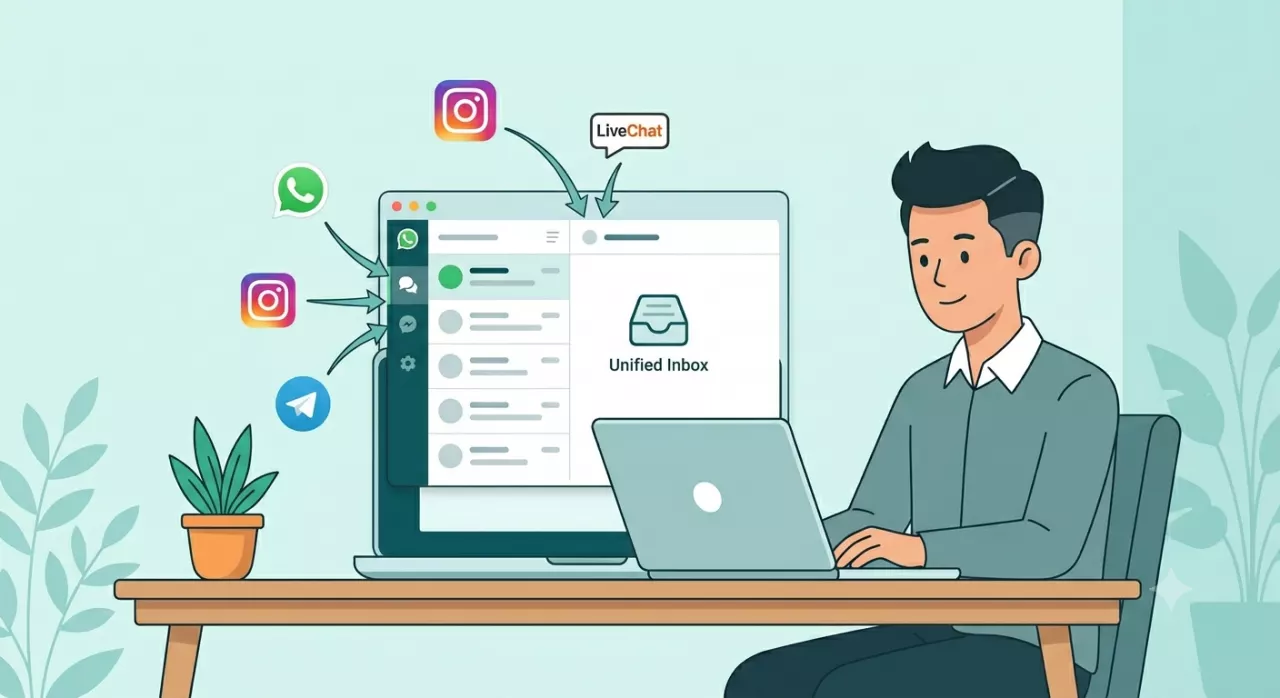
An omnichannel inbox is one dashboard that houses all conversations from all channels simultaneously.
WhatsApp comes in. Instagram comes in. Messenger comes in. Telegram comes in. Website live chat comes in. All in one screen, one queue, one view.
Admins don't need to open and close apps. Each customer's conversation history is stored across channels — so if a customer who chatted on IG yesterday uses WA today, the admin immediately knows the context, who they are, and what has been discussed.
What Changes After Using an Omnichannel Inbox
Response time drops drastically No more "oh I thought it was already answered on IG." All incoming messages are visible in one priority queue. Admins immediately know which ones haven't been answered and need to be responded to first.
Admin productivity increases without hiring new people Because they don't waste time switching apps and searching for context here and there, the same admin can handle more chats per day. This is real efficiency that is immediately felt in operations.
Customer history is always complete All conversations from all channels per customer are stored in one profile. Admins can see: "Oh, this is the one who bought a shirt last month, now asking about pants." Service feels personal and professional.
No chat can "escape" The system marks all unread messages. There are filters: All / Unanswered / Unassigned. No matter how many chats come in, all are recorded and tracked.
Owners can monitor performance The dashboard provides full visibility: how many total chats today, how many have been answered, how many are still pending, and which agent is the most responsive.
If Your Team Has More Than One Person
An omnichannel inbox becomes even more powerful if you have multiple admins or CS.
Chats can be assigned to specific agents — so there's clear accountability. Handling together is also possible, with a system ensuring one chat is only handled by one person. No more drama "hey, who answered this?"
And if there are shifts — morning, afternoon, evening — each shift immediately knows the context of all ongoing conversations. No need for manual briefings, all history is already there.
CRM Chat Feature in cshub
cshub connects all communication channels to one CRM Chat with a centralized inbox:
WhatsApp Cloud API (official WA Business)
WhatsApp Unofficial (no Meta approval needed)
Instagram DM
Facebook Messenger
Telegram
LiveChat widget for websites
Equipped with:
Filter All / Unread / Unassigned / Assigned
Search conversations by name or message content
Labels and tags per contact
Complete cross-channel chat history per customer
Can handle multiple agents simultaneously without overlap
Automatic routing based on label or channel
All in one package — without additional per-channel costs.
Customers Are Impatient, and It's Not Their Fault
In the era of WhatsApp and Instagram, customers are used to quick responses. They won't wait while hoping you finally open the right app. They immediately scroll to the next store.
A proper inbox isn't a luxury — it's the basic infrastructure of a serious online business.
Try cshub free for 7 days at cshub.id. Set up your omnichannel inbox in 15 minutes, and see the difference for yourself.
Frequently Asked Questions
What is the difference between an omnichannel inbox and regular WhatsApp Business? Regular WhatsApp Business only handles one channel (WhatsApp). An omnichannel inbox combines WA, Instagram, Messenger, Telegram, and live chat into one dashboard — with cross-channel history per customer.
Can one WhatsApp number be accessed by multiple admins simultaneously? Yes. With the multi-agent system in cshub, one WA number can be accessed simultaneously by multiple admins from different devices. Chats can be assigned to specific agents to avoid conflicts.
If a customer chats on Instagram and WA, is the history connected? Yes. In cshub, all conversations from all channels for the same contact are stored in one profile. Admins can immediately see the full history without needing to manually connect them.
Does the setup require technical skills or coding? No. Channel integration in cshub can be done through the dashboard without coding. The cshub support team is also ready to assist with the setup from the start.
What channels can be connected to cshub? WhatsApp Cloud API, WhatsApp Unofficial, Instagram, Facebook Messenger, Telegram, and LiveChat widget. All go into one inbox.
Are there notifications if a chat goes too long without a response? Yes. The escalation feature in cshub can be configured to send notifications to admins or owners if a chat exceeds the response time limit you set yourself.